
Table of Contents
- Core Technical Features of an AI WordPress Plugin for Auto Content
- Existing Content Analysis Functions
- Built-In SEO Capabilities
- Anti-Cannibalization Strategies
- Integration with Popular SEO Tools
- Quality and Customization Considerations
- Performance Metrics and Reporting
- Pricing and Scalability
- Frequently Asked Questions
Choosing the right AI WordPress plugin for auto content can mean the difference between successfully scaling your blog and running headlong into keyword cannibalization and low-quality output. With so many options on the market, knowing which technical features and SEO capabilities to prioritize is essential before you commit to any solution.
Core Technical Features of an AI WordPress Plugin for Auto Content
A robust auto-content plugin must have certain baseline technical capabilities to operate reliably within your WordPress environment.
Compatibility with Your Existing Setup
Confirm that the plugin is compatible with your version of WordPress and popular themes like Astra, GeneratePress, or Divi. A well-built AI WordPress plugin for auto content should run conflict-free alongside essential plugins such as Yoast SEO, Rank Math, WooCommerce, and Elementor.
Also check PHP and MySQL requirements. Most modern plugins require PHP 7.4 or higher, but some demand even newer versions to take full advantage of the latest AI capabilities.
Processing Architecture
There are two main approaches: plugins that process content on your own server versus those that call external APIs. The former gives you greater control and privacy, while the latter typically delivers more advanced AI capabilities through services like GPT-3 or Claude.
If your site handles sensitive data or you prefer to keep all processing in-house, look for plugins that support local AI models or allow you to configure your own private APIs.
Existing Content Analysis Functions
One of the most important differentiators is how well a plugin can analyze and understand your existing content before generating anything new.
Semantic Site Scanning
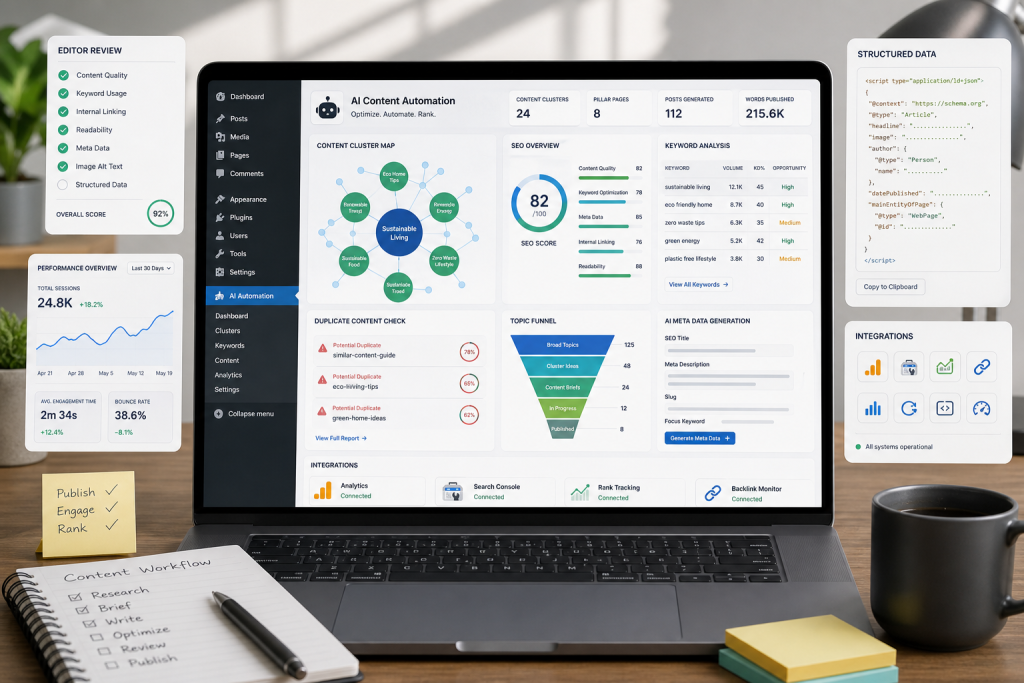
The ideal AI WordPress plugin for auto content should be able to map your existing content, identify your core topic clusters, and flag potential gaps in your editorial strategy. This prevents the system from generating articles on topics you’ve already covered thoroughly.
Look for plugins that offer dashboards where you can visualize the thematic distribution of your content and the opportunities surfaced by the AI algorithm.
Primary and Secondary Keyword Detection
An advanced system should automatically extract the main keywords from your existing posts and build a semantic map of your entire site. This allows the AI to generate complementary content that reinforces your topical authority without triggering internal competition.
According to research on search engine optimization, keyword cannibalization can reduce organic traffic by up to 35% on sites that publish content without a clear editorial strategy.
Built-In SEO Capabilities
Not every auto-content plugin is designed with SEO in mind. Here are the specific features to look for.
Automated Metadata Generation
The plugin should automatically create SEO titles, meta descriptions, and optimized URL structures. The best systems let you customize templates so that metadata follows patterns specific to your niche.
Check whether the plugin can generate image alt text, properly structure headings (H1, H2, H3), and create contextually relevant internal links pointing to your existing content.

Featured Snippet Optimization
An advanced AI WordPress plugin for auto content should structure output to maximize your chances of appearing in Google’s featured snippets. This means generating ordered lists, comparison tables, and concise paragraphs that directly answer specific questions.
The ability to automatically generate structured data markup (Schema.org) is another strong indicator of a plugin’s technical quality.
Anti-Cannibalization Strategies
Preventing your own pages from competing against each other for the same keywords is one of the biggest challenges when using AI for content at scale.
Duplicate-Prevention Algorithms
Look for plugins that implement dedicated algorithms to detect semantic similarities between proposed content and your existing posts. The most sophisticated systems use natural language processing models to understand the context and intent behind each piece of content.
Some plugins provide similarity scores that alert you when generated content might compete with existing posts. A recommended threshold is keeping semantic similarity below 60%.
Topic Cluster Planning
The best AI WordPress plugins for auto content don’t just avoid cannibalization — they actively build coherent topic clusters. That means organizing content into pillar pages and supporting articles that reinforce each other’s rankings.
This feature should include the ability to automatically categorize content as BOFU (Bottom of Funnel), MOFU (Middle of Funnel), or TOFU (Top of Funnel), creating a strategically planned content funnel from the ground up.
Integration with Popular SEO Tools
Compatibility with your existing SEO stack is critical for maintaining an efficient workflow.
Native Connectors
Verify that the plugin integrates natively with tools like Google Search Console, Ahrefs, SEMrush, or Surfer SEO. This integration lets the AI access real keyword performance data and adjust the content strategy based on concrete metrics.
The most advanced plugins can automatically import keyword opportunities from these platforms and prioritize them by traffic potential and competition difficulty.
Analytics Tool Synchronization
The ability to connect with Google Analytics 4 and Google Tag Manager allows the plugin to learn from your audience’s real engagement metrics and adjust the type of content generated accordingly.
This continuous feedback loop is essential for refining the quality and relevance of auto-generated content over time.
Quality and Customization Considerations
Not all AI-generated content maintains the same quality level. These features will help you evaluate and control the output.
Custom Prompt Configuration
A professional AI WordPress plugin for auto content should allow full customization of the prompts used to generate content. This includes the ability to define tone of voice, writing style, complexity level, and preferred structure for each content type.
The best systems offer pre-configured prompt templates for different industries — healthcare, technology, finance, e-commerce — which you can adapt to the specific needs of your niche.
Pre-Publication Review and Editing
Even when automation is the goal, maintaining editorial control is non-negotiable. Look for plugins that offer review workflows where you can approve, edit, or reject content before it publishes automatically.
Top-tier tools include quality scoring systems that evaluate factors like coherence, originality, SEO relevance, and readability before recommending publication.
Performance Metrics and Reporting
To assess the ROI of your automation investment, you need clear data on how your generated content is actually performing.
Built-In Metrics Dashboard
The plugin should provide detailed SEO performance metrics for generated content, including ranking positions, organic traffic generated, click-through rates, and average time on page.
Some advanced plugins offer side-by-side comparisons of AI-generated content performance versus manually written content, giving you the data you need to continuously optimize your strategy.
Alerts and Notifications
Setting up automatic alerts for significant ranking changes, potential cannibalization detection, or emerging content opportunities keeps you informed without requiring constant manual monitoring.
Pricing and Scalability
The pricing model and ability to scale are decisive factors in your final choice.
Transparent Pricing Models
Avoid plugins with hidden costs or vague usage limits. The best AI WordPress plugins for auto content offer pricing based on content volume generated, number of sites, or specific feature tiers.
Factor in the total cost, including potential expenses for external APIs (OpenAI, Claude, etc.) if the plugin doesn’t include AI processing in its base price.
Scaling Capabilities
If you plan to expand your content strategy, verify that the plugin can handle multiple sites, different languages, and high generation volumes without degrading performance.
Enterprise-grade systems typically include features like white-labeling, APIs for custom integrations, and priority support.
Frequently Asked Questions
How much content can a WordPress AI plugin generate per day?
Capacity varies significantly across plugins. Basic systems can generate 5–10 articles per day, while enterprise solutions can produce hundreds of pieces. The limit is usually determined by the restrictions of the AI API being used and your server’s available resources.
Do auto-content plugins affect site loading speed?
Well-optimized plugins should have minimal impact on loading speed, especially if they process content in the background. However, plugins that load multiple scripts on the frontend or perform intensive on-page processing can slow your site down. Always test performance before deploying fully.
Do I need technical knowledge to configure an AI plugin?
The best plugins are designed for non-technical users, offering intuitive interfaces and wizard-based setup. That said, taking advantage of advanced features like custom prompts or API integrations may require a basic level of technical know-how.
How can I evaluate the quality of generated content?
Use both technical and human metrics: readability scores (Flesch-Kincaid), originality checks (plagiarism detectors), SEO relevance tools (like Surfer SEO), and — critically — manual editorial review to verify accuracy and brand consistency.
Do search engines penalize AI-generated content?
Google doesn’t specifically penalize AI-generated content — it penalizes low-quality content regardless of origin. The focus should always be on producing useful, original, well-optimized content that delivers genuine value to users.
Ultimately, selecting the right AI WordPress plugin for auto content comes down to your specific needs, budget, and desired level of editorial control. Evaluate every option against the technical and functional criteria outlined here to make an informed decision that truly advances your content strategy. If you need help implementing a complete automation solution, you can explore our service options.
Team’s Take
In our experience working with content automation, most bloggers focus almost exclusively on a plugin’s generation capacity while overlooking critical aspects like cannibalization prevention and integration with existing SEO tools. The most common problems we see stem precisely from this lack of upfront technical evaluation. A plugin that analyzes your existing content and strategically plans new material doesn’t just automate creation — it strengthens your entire SEO architecture for the long term.

Written by
Klusto Team
Klusto is the WordPress plugin that automates your SEO blog with AI: plans BOFU/MOFU/TOFU clusters, prevents 3-layer cannibalization, and publishes optimized articles without leaving wp-admin. No external SaaS. No migration.